Pinit · iPhone · Free
Capture places, not just moments.
Pin a GPS spot with a photo and a note, then find your way back later. Pinit ties your image to the exact time, place, and context in a single tap.

Pinit · iPhone · Free
Pin a GPS spot with a photo and a note, then find your way back later. Pinit ties your image to the exact time, place, and context in a single tap.
Drop a pin
Pin your current GPS location instantly, then attach a photo and the exact date and time you were there.
Add a quick comment to remember what made the place special, so the memory has time, place, and context all in one.
Find your way back
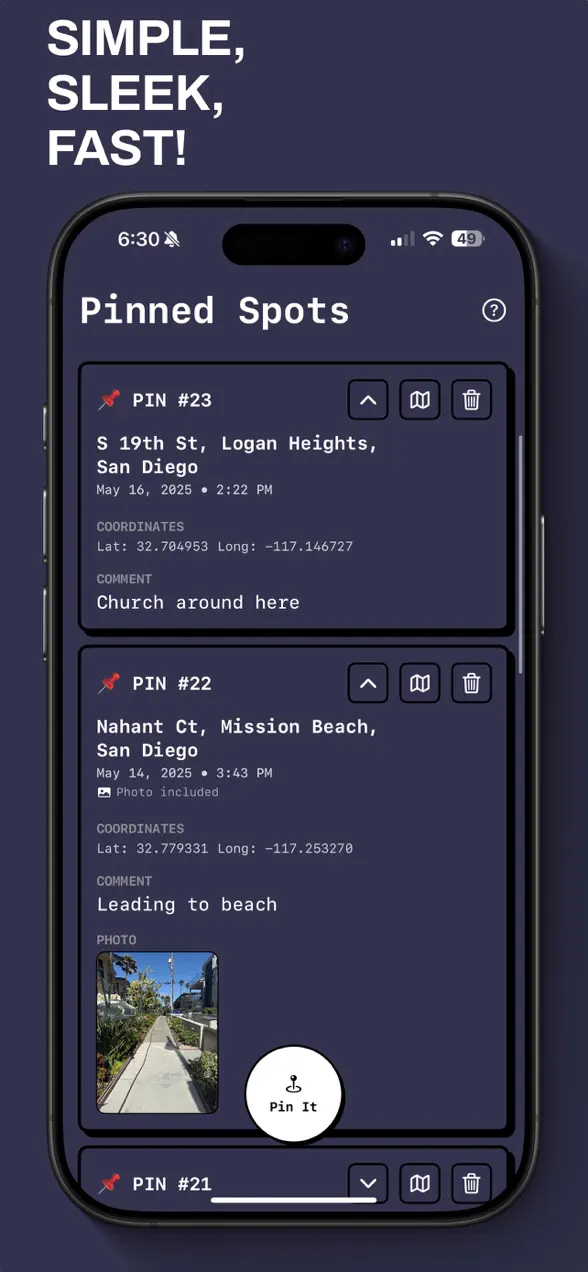
Browse every saved pin in a clean, modern list, with the photo, note, and date for each one.
When you want to return, tap to open Apple Maps and get directions straight back to the spot.

More to love
For runners, travelers, location scouts, and anyone who says, "I will come back here later."